
Registration
| CITO 2026* |
Until 08/03/2026 |
From 09/03/2026 to 26/04/2026 |
From 27/04/2026 to 03/05/2026 |
| Active assistant | 150 € | 180 € | 210 € |
| Active assistant from low-income countries | 130 € | 160 € | 190 € |
| Unemployed assistant** | 50 € | 75 € | 100 € |
| Unemployed PhD or Master’s degree student *** | 50 € | 75 € | 100 € |
| UMH internship tutors (Attendance) | 0€ | 0€ | 0€ |
| UMH internship tutors (Submission of a paper as an author) | 0 € | 10€ | 20 € |
| UMH internship tutors (presenting more than one paper as author) | 20 € | 35 € | 50 € |
| *Registration fees include attendance at the sessions, documentation. Working lunches are not included. **Accreditation with unemployment card ***Accreditation of enrolment. | |||
Instructions for registration:
Purpose: To manage the registration and development of the UMH INTERNATIONAL CONGRESS OF OCCUPATIONAL THERAPY.
Legitimation: Art. 6.1.e) GDPR: the processing is necessary for the performance of a task carried out in the public interest or in the exercise of official authority vested in the controller. Art.6.1.a)
International assignments/transfers: Please note that the event will be broadcast online.
Rights: Access, rectify and delete data, as well as other rights, as explained in the additional information.
More information: Privacy Policy
If you cannot access the registration website by clicking on the title of this section, access it manually by copying this link into your browser: https://universite.umh.es/fpogestion/aspx/Preinscripcion/Preinscripcion.aspx
There, select the option ‘Congresses, seminars and conferences’ under type and ‘International Congress of Occupational Therapy (IX CITO)’ under subtype. Then click Continue.
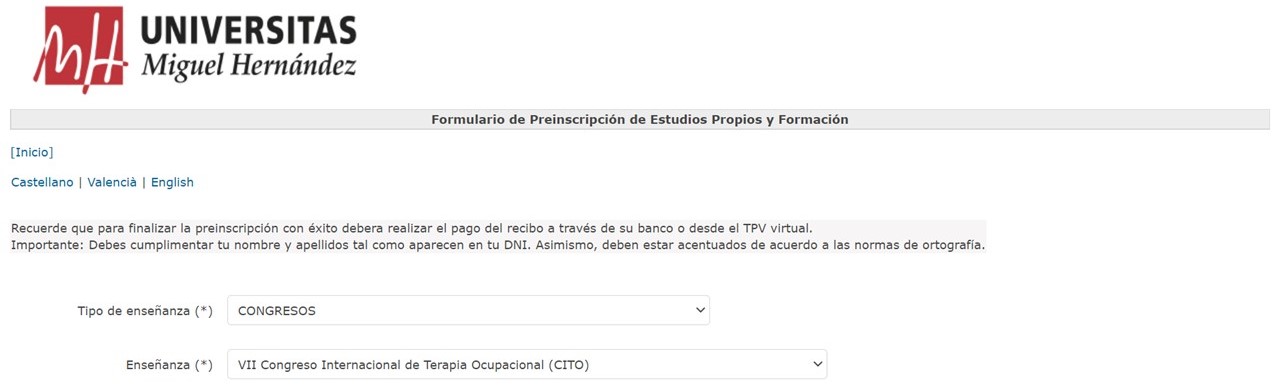
The receipts have a date indicated, if you do not pay before that date you will be deleted from the system and therefore you will not be registered in the congress. We recommend that you keep your proof of payment and bring it with you to the congress in case we ask for it at any time.
If you have any problems with the process, please contact us by email at .